AudioMass
In-depth reviewFree online audio editor. Cut, trim, and apply effects to audio files directly in your browser without uploading to a server. Supports MP3, WAV, OGG. Privacy-respecting.
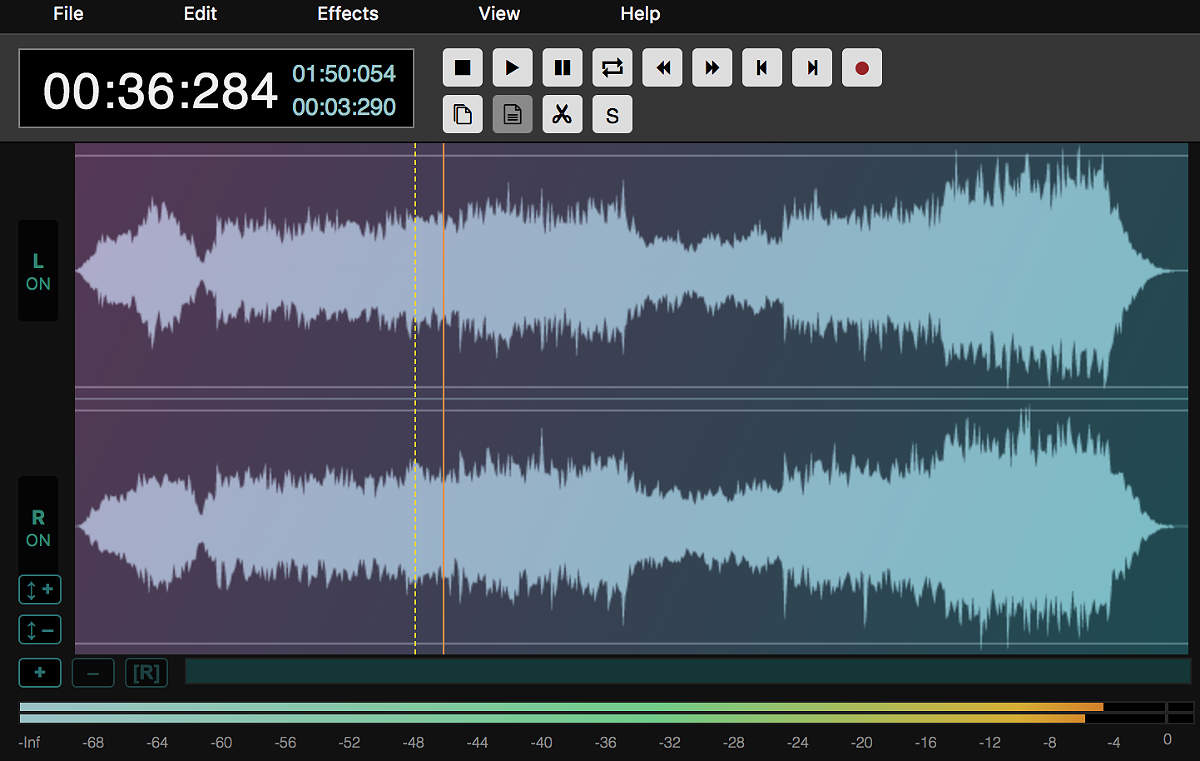
AudioMass, as it opens in a browser tab.
Not sure how to add AudioMass to your home screen? Step-by-step for Chrome, Safari, Firefox and Edge — it takes about ten seconds, and there is no app store involved.
Own AudioMass? Have us re-run this measurement — we open it in a real browser, cut the network, and send you what survived.
How to install AudioMass as a PWA
Screenshots
Why we recommend AudioMass
Editing a sound file usually means installing something. AudioMass does the whole job — trimming, fading, normalising, compression, reverb, pitch and speed — in a browser tab, with the audio never leaving your machine: it is read from local disk and processed by the Web Audio API on your own CPU. That matters for the obvious privacy reason, and for a less obvious practical one: there is no upload wait. Open a 40 MB WAV and you are editing it immediately, not watching a progress bar. It is free, open source, and has no account, no watermark and no export limit — a rare combination in audio tools, where the free tier usually stamps something on your output.
Best use cases
Cutting the dead air from the start and end of a podcast recording before sending it to an editor. Trimming a sample down to the bar you actually want. Normalising a batch of voice memos so they play at the same level. Doing a quick fix on a borrowed machine where you cannot install software — a school computer, a client's laptop, a friend's desktop. It is the tool for the ten-minute audio job that does not justify opening a full workstation.
Honest limitations
It is a single-track waveform editor, not a multitrack studio: you cannot layer a voice over music and mix them. There is no MIDI, no instrument, no plugin support. Very long files are limited by browser memory — an hour of uncompressed audio will strain a modest machine, and the tab can be killed by the operating system. And there is no autosave: close the tab without exporting and the edit is gone. Export early if the session matters.
Are you the maker of AudioMass? Claim this listing →
AudioMass in our guides
Similar to AudioMass

Bulk image editing in your browser — resize, crop, convert, compress hundreds of images at once. All processing is local, no server uploads. A massive time-saver for content creators.
Convert between 500+ file formats in your browser. Documents, images, audio, video, ebooks — fast client-side conversion that doesn't upload your files to a server. Conversion runs client-side, so a confidential document is never uploaded anywhere to change format.
ImgMin is a free, privacy-focused online tool for compressing JPG, PNG, and WebP images. It performs all processing directly in your browser, ensuring no uploads and enhanced security. Reduce file sizes by up to 80% with adjustable quality settings and batch processing.
PDFMinty is a privacy-first, browser-based PDF toolkit offering 22 tools for managing documents. Users can merge, split, compress, protect, convert, and edit PDFs directly in their browser. All processing occurs locally, ensuring files remain on your device, making it suitable for sensitive documents.

Pair two browsers with a QR code to move encrypted live text and one selected file between phone, laptop, tablet, or desktop. No login, no app install, no cloud drive — scan, open the link, and both sides share the same live text field.

End-to-end encrypted office suite — docs, spreadsheets, kanban, code pads. No account needed for guest use. Hosted in France, GDPR-native. The privacy-first Google Docs alternative.
Own a PWA? See the listing options — standard submission is free.