Excalidraw
In-depth reviewCollaborative virtual whiteboard with a hand-drawn feel. Open-source Miro/Figma FigJam alternative — real-time collaboration, offline support, and end-to-end encrypted rooms.
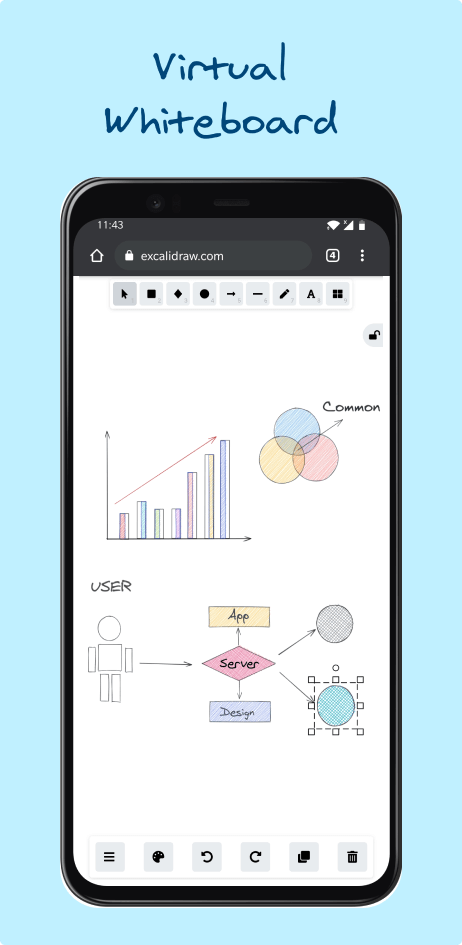
Excalidraw, as it opens in a browser tab.
Not sure how to add Excalidraw to your home screen? Step-by-step for Chrome, Safari, Firefox and Edge — it takes about ten seconds, and there is no app store involved.
Own Excalidraw? Have us re-run this measurement — we open it in a real browser, cut the network, and send you what survived.
How to install Excalidraw as a PWA
Screenshots
4 images · scroll →


Why we recommend Excalidraw
Excalidraw is the canonical answer when an engineer says 'let me sketch this real quick.' The hand-drawn aesthetic is intentional — it lowers the perceived investment in any diagram, which makes people willing to throw boxes-and-arrows at problems they'd never bother to formalise in Lucidchart or Figma. The MIT-licensed core has been adopted by Notion (their whiteboard shipped on top of Excalidraw), VS Code (the Excalidraw extension), and Obsidian (excalibrain plugin), which tells you something about the quality of the underlying code. As a PWA, it works fully offline — your boards live in IndexedDB, no cloud account needed. When you do want collaboration, the free public service supports E2E-encrypted rooms (the URL contains the encryption key), and self-hosting via excalidraw-room takes ~10 minutes if you want to keep everything internal. The library of community-built shape libraries (icons, AWS/GCP/Azure assets, mermaid sequence diagrams) means you can go from sketch to publishable architecture diagram in the same canvas.
Best use cases
Best for: software architecture sketches in standups, system-design interview preparation, classroom whiteboarding, async PR reviews where a diagram explains intent faster than text, and quick collaborative brainstorming on a Zoom call (everyone hits a shared link). The Mermaid-to-Excalidraw bridge is excellent for turning text-defined sequence/flow diagrams into editable shapes.
Honest limitations
Not for: high-fidelity UI mockups (Figma owns this — Excalidraw's strength is purposeful imprecision). Not for: massive boards with 1000+ elements — the canvas slows down past a few hundred shapes. Real-time collaboration via the public server has no persistence: when the last participant leaves, the room disappears unless someone exports the file. For team-grade persistence, self-host or use a wrapping product like Excalidraw+.
Are you the maker of Excalidraw? Claim this listing →
Excalidraw in our guides
Similar to Excalidraw
Infinite canvas whiteboard for quick sketches and diagrams. Minimal, fast, collaborative. Open-source alternative to Miro with a focus on simplicity and developer extensibility. The canvas has no fixed page size, so a sketch can grow in any direction without being rescaled to fit.

Open-source all-in-one workspace — docs, kanban, and whiteboards in one canvas. Local-first, privacy-focused Notion + Miro alternative. Everything is editable, even the schema. Documents and whiteboards are two views of the same content, so a note can become a diagram without being copied.
End-to-end encrypted office suite — docs, spreadsheets, kanban, code pads. No account needed for guest use. Hosted in France, GDPR-native. The privacy-first Google Docs alternative.

Simplify documentation and avoid heavy tools. Open source Visio Alternative. Commonly used for explaining your code! Mermaid is a simple markdown-like script language for generating charts from text via javascript.

Free, open-source diagramming tool. Flowcharts, network diagrams, UML, floor plans. Works offline, saves to Google Drive/GitHub/local. Widely used in enterprises as a Visio alternative. Files stay in the .drawio XML format, so a diagram remains editable years later without the tool that made it.
End-to-end encrypted note-taking app. Zero-knowledge sync across devices. Open-source and audited. The Evernote/Notion alternative that genuinely can't read your notes. Notes are encrypted on the device before they ever sync, so the server stores ciphertext it cannot open.
Own a PWA? See the listing options — standard submission is free.