GifGlide
In-depth reviewGifGlide is a web-based video to GIF converter, enabling users to create lightweight GIFs from MP4, MOV, and AVI video files. It offers options to trim videos, adjust FPS, quality, and dimensions, catering to both free and premium users seeking efficient GIF creation.
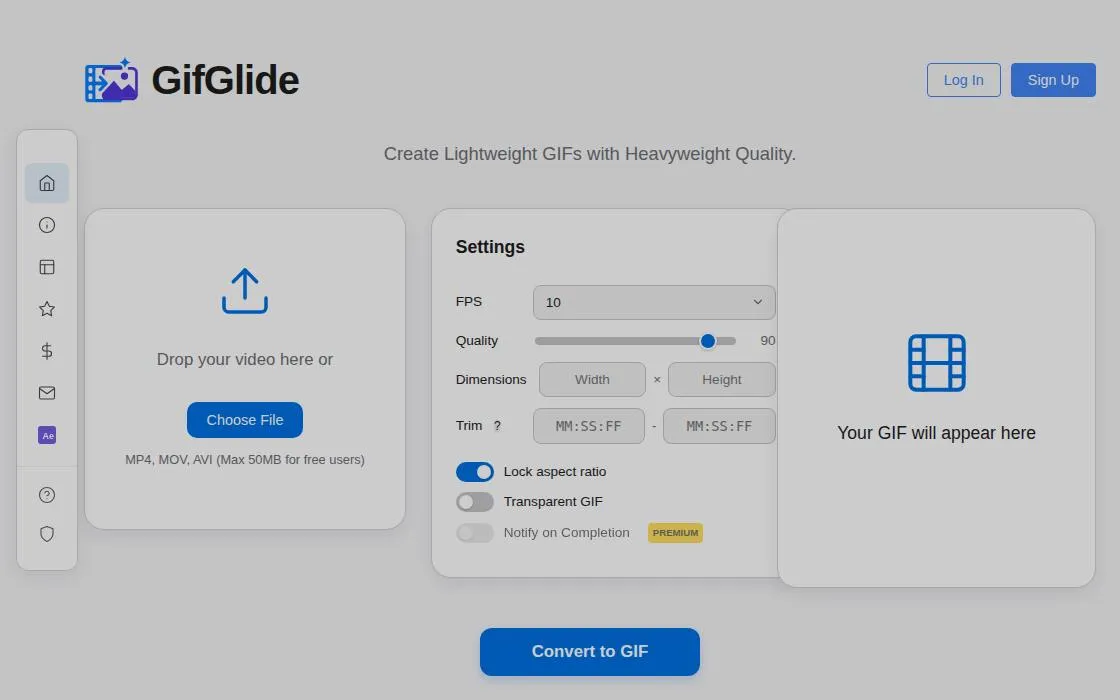
GifGlide, as it opens in a browser tab.
Not sure how to add GifGlide to your home screen? Step-by-step for Chrome, Safari, Firefox and Edge — it takes about ten seconds, and there is no app store involved.
Own GifGlide? Have us re-run this measurement — we open it in a real browser, cut the network, and send you what survived.
How to install GifGlide as a PWA
Why we recommend GifGlide
GifGlide stands out as a direct and accessible solution for converting videos into GIFs. The application provides essential controls like video trimming, adjustable frames per second (FPS), quality settings, and output dimensions, allowing users to customize their GIFs. It directly supports common video formats such as MP4, MOV, and AVI. The service offers a straightforward "drag and drop" interface for video uploads, simplifying the conversion process. While a free tier exists with a file size limit, the option to upgrade to a Premium Membership enhances the user experience with features like faster conversions and a user dashboard, making it suitable for both casual and more frequent GIF creators.
Best use cases
Best for: Users who need to quickly convert short video clips into GIFs for social media, presentations, or website content. It's ideal for designers and content creators looking to generate animated images from existing video assets without specialized software. Also suitable for individuals wanting to create lightweight animated images from personal video recordings.
Honest limitations
GifGlide is not designed for advanced video editing or complex animation creation beyond GIF conversion. Free users face a 50MB maximum file size limit, which may restrict conversions of longer or higher-resolution videos. The service primarily focuses on the video-to-GIF function, lacking broader media manipulation capabilities. Pricing tiers are present, meaning full features like priority processing and a conversion history dashboard are reserved for premium subscribers.
Are you the maker of GifGlide? Claim this listing →
Similar to GifGlide
The internet's GIF workbench since forever — make, resize, crop, optimise, reverse and caption GIFs, convert video to GIF and back, and tweak APNG and WebP, all free with no account. ezgif.com ships a standalone manifest with a full icon set, so it installs as a quick-access media tool from the browser.
PhotoStack is a browser-based image tool that converts, resizes, watermarks, and crops pictures in a few clicks. It suits bloggers, sellers, and anyone preparing photos for the web who wants quick edits without installing desktop software like Photoshop.

Decorate a 3D paper toy with shapes and stickers, then print a one-page sheet and fold it into a real critter. Opens in the browser with no account, and the studio keeps working offline.

ReWords AI allows users to edit and replace text directly within images online. It aims to match the original font, style, and background of the text being replaced. This tool is designed for updating text in flat image files like screenshots, posters, or packaging without needing original project files.

Typometer helps designers and developers compose typographic scales using CSS tokens. It provides a structured approach to defining font sizes and line heights for consistent web typography, offering tools to establish a visual hierarchy across projects.

Full-featured photo editor in your browser — opens and saves PSD, XCF, Sketch files. Layers, masks, filters, blend modes. A genuinely free Photoshop replacement that needs no install.
Own a PWA? See the listing options — standard submission is free.