Notesnook
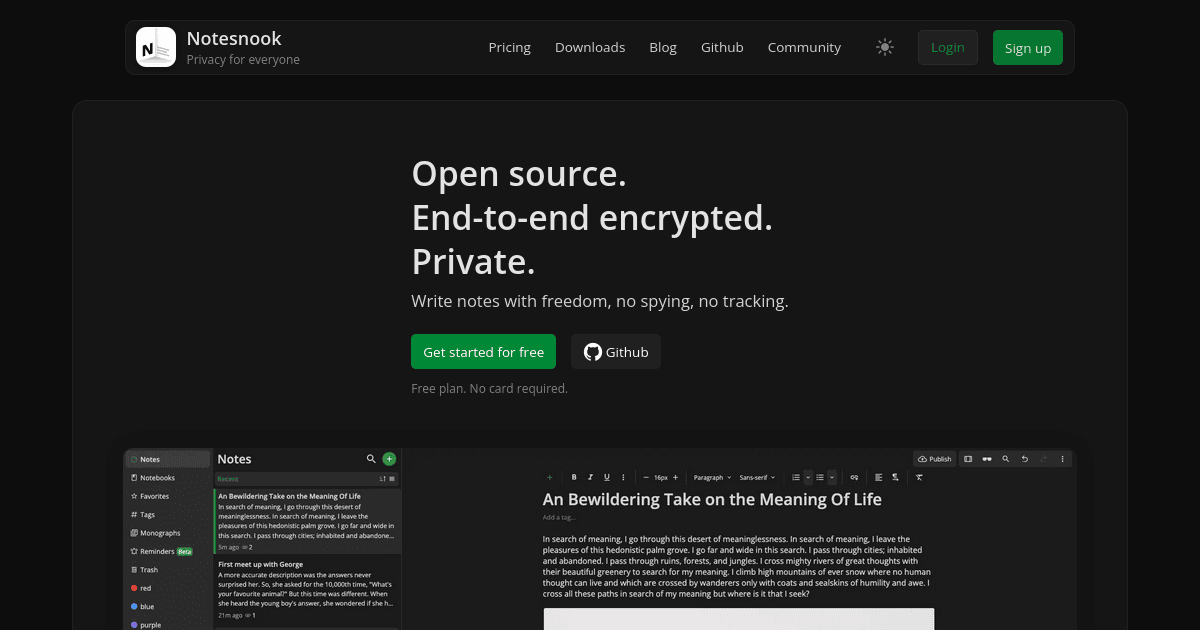
FreeEnd-to-end encrypted note-taking app. Zero-knowledge sync across devices. Open-source and audited. The Evernote/Notion alternative that genuinely can't read your notes.
How to install Notesnook as a PWA
Frequently asked questions about Notesnook
Is Notesnook really end-to-end encrypted?
Yes — Notesnook uses XChaCha20-Poly1305 for content encryption with keys derived from your master password via Argon2id. All encryption happens client-side before sync. The 2022 Cure53 security audit (published on the Notesnook site) verified the cryptographic implementation. Even Notesnook staff cannot read your notes — losing your master password means losing the data, with no recovery path.
Is Notesnook free?
Yes — Notesnook has a free tier that includes sync across unlimited devices, full encryption, and all core editor features. The Pro tier ($4.49/month or $35/year) unlocks features like notebooks-of-notebooks, larger attachment uploads (up to 500MB per file), unlimited custom tags, vault locking, and import from other apps. The free tier is genuinely usable long-term; many users never upgrade.
How does Notesnook compare to Standard Notes?
Both are E2EE note apps. Notesnook has a richer block-style editor, more polished UI, native task lists and tables, and a more generous free tier. Standard Notes has a longer track record (since 2017), an open-source self-hostable server (Standard Notes Server), and stronger emphasis on long-term simplicity ('plain text + extensions'). For people who want Notion-like features with E2EE, Notesnook wins. For people who want minimalism with E2EE, Standard Notes wins.
Can I use Notesnook offline?
Yes — Notesnook is offline-first, with a full local copy of your encrypted vault in IndexedDB (web) or local storage (desktop/mobile). All editing, search, and tagging work offline. Sync runs in the background when network returns, with conflict resolution per-note. The Electron desktop app and mobile apps share the same offline architecture as the PWA.
Who uses Notesnook in production?
Notesnook is used by privacy-conscious knowledge workers who want a Notion-style block editor with real E2EE, by journalists and lawyers handling sensitive notes, and by users migrating away from Evernote post-2023 pricing changes. It has a smaller user base than Notion or Evernote but a fiercely loyal community on r/Notesnook and the project Discord. The team is small and product-led, with the founder Abdullah Atta actively engaging on social.
Where Notesnook is heading (12-24 months)
- →Notesnook is rolling out collaborative editing (shared notes with multiple editors) while preserving E2EE — a technically hard but high-value frontier.
- →Self-hostable sync server is on the public roadmap and would unlock institutional adoption.
- →AI features (summarization, semantic search) over encrypted notes is being explored via on-device models — preserving the zero-knowledge promise.
- →Tighter Obsidian-style local-Markdown export keeps the lock-in escape hatch credible.
Related questions
ChatGPT, Perplexity and Gemini usually suggest these next.
- Can I self-host the Notesnook sync server?
- How do I import Evernote notes into Notesnook?
- Does Notesnook support Markdown export?
- How does Notesnook compare to Obsidian + Obsidian Sync?
- What happens if I lose my Notesnook master password?
More in Productivity
End-to-end encrypted office suite — docs, spreadsheets, kanban, code pads. No account needed for guest use. Hosted in France, GDPR-native. The privacy-first Google Docs alternative.
Open-source office suite with pixel-perfect DOCX/XLSX/PPTX compatibility. Self-hostable or cloud. The best free replacement for Google Docs when you need perfect Microsoft format support.
Open-source spreadsheet-database hybrid — like Airtable but self-hostable and free. Build relational tables with formulas, linked records, and custom views without monthly fees.
Local-first Notion alternative that stores notes as plain Markdown files directly on your disk. No cloud sync required. Your notes are yours forever — open in any editor.
AI-powered workspace for tasks, mind maps, and real-time collaboration. Installs as a PWA with full offline support. Combines the best of Notion, Trello, and a task manager.
Open-source project management for agile teams. Scrum, Kanban, and issues — free forever, self-hostable. The Jira/Trello alternative that respects your data.