PDFCheetah
In-depth reviewPDFCheetah offers 20 free online tools for managing PDF files directly in your browser. Users can merge, split, compress, edit, sign, protect, and convert PDFs to or from JPG/PNG formats. It operates without file uploads, account creation, or daily limits, ensuring your documents remain on your device.
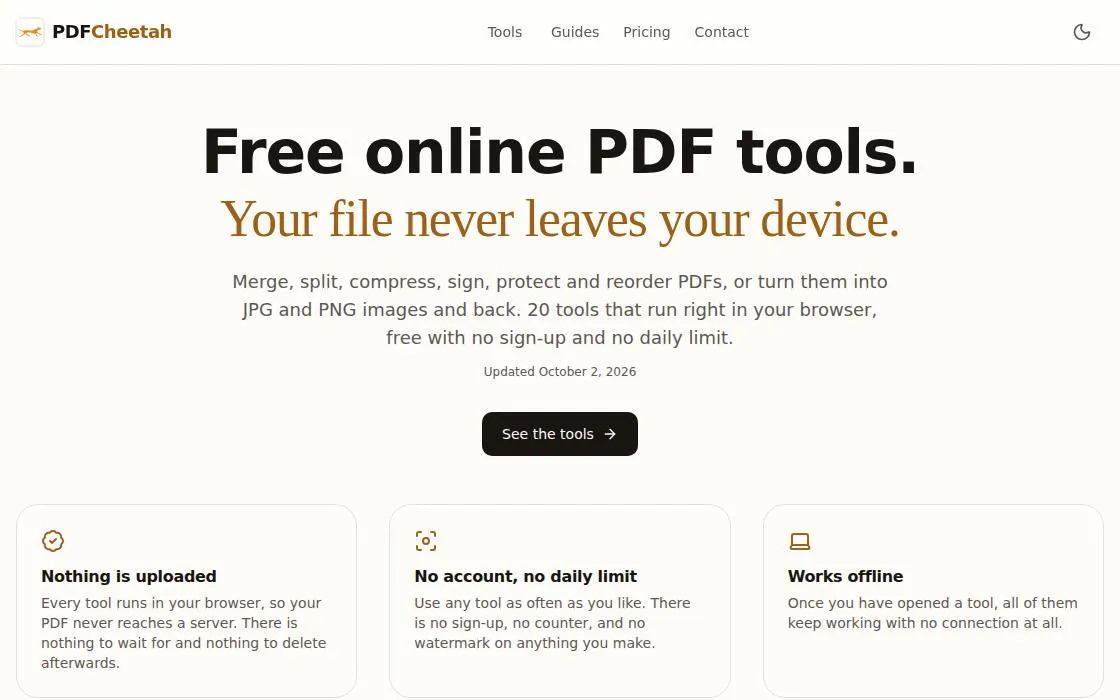
PDFCheetah, as it opens in a browser tab.
Not sure how to add PDFCheetah to your home screen? Step-by-step for Chrome, Safari, Firefox and Edge — it takes about ten seconds, and there is no app store involved.
Own PDFCheetah? Have us re-run this measurement — we open it in a real browser, cut the network, and send you what survived.
How to install PDFCheetah as a PWA
Why we recommend PDFCheetah
PDFCheetah stands out for its strong commitment to user privacy and accessibility. All 20 tools run entirely within your browser, meaning no files are ever uploaded to a server, enhancing security and privacy for sensitive documents. This approach also eliminates waiting times for uploads and downloads. The app is completely free, with no account required, no daily limits, and no watermarks on processed files. It offers a comprehensive suite of PDF manipulation tools, from basic merges and splits to more advanced features like signing, watermarking, and password protection, all accessible without a subscription or signup.
Best use cases
Best for: Individuals and businesses needing secure, on-the-fly PDF modifications without sharing their documents online. Ideal for quickly combining multiple reports, extracting specific pages from a large document, or compressing a file for email. It's also suitable for converting images to PDFs and vice-versa, or adding basic edits and signatures to documents without installing software.
Honest limitations
While robust for browser-based operations, PDFCheetah does not offer advanced desktop-grade PDF editing features that might require deep document restructuring or complex layout designs. It also lacks direct cloud integration for saving or retrieving files from services like Google Drive or Dropbox. Users needing these functionalities may find a dedicated desktop application or a cloud-integrated solution more appropriate.
Are you the maker of PDFCheetah? Claim this listing →
Similar to PDFCheetah
PDFMinty is a privacy-first, browser-based PDF toolkit offering 22 tools for managing documents. Users can merge, split, compress, protect, convert, and edit PDFs directly in their browser. All processing occurs locally, ensuring files remain on your device, making it suitable for sensitive documents.
Convert between 500+ file formats in your browser. Documents, images, audio, video, ebooks — fast client-side conversion that doesn't upload your files to a server. Conversion runs client-side, so a confidential document is never uploaded anywhere to change format.

DS Supplements offers a personalized dosage calculator for Targeted Nutritional Intervention (TNI) supplements, specifically designed for individuals with Down syndrome (Trisomy 21). Developed by Dr. rer. nat. Petra Buchanan, the app provides free tools to calculate BMI, growth percentiles, and vitamin D levels, offering valuable insights for caregivers.

Histmed is a personal clinical archive that helps users organize medical reports, analyses, and prescriptions on their device. It offers a local-first approach, storing data only on the user's device without requiring an account or cloud storage. It supports importing PDFs, ZIPs, and photos for easy access.

Professional-grade photo editor in the browser. Layers, blend modes, healing brush, selection tools — a capable Photoshop-lite that works on any device with a browser. Layer masks and blend modes behave as in a desktop editor, so a PSD opens with its structure intact.
MultiCam Studio Pro is an OBS-style browser studio for multicam recording, screen shares, and audio mixing. It allows users to record cameras, screens, and microphones locally in high fidelity, mix audio live, and annotate on screen, then cut it all on a multi-track timeline, suitable for creating tutorials, presentations, demos, courses, and videos.
Own a PWA? See the listing options — standard submission is free.