Veganify
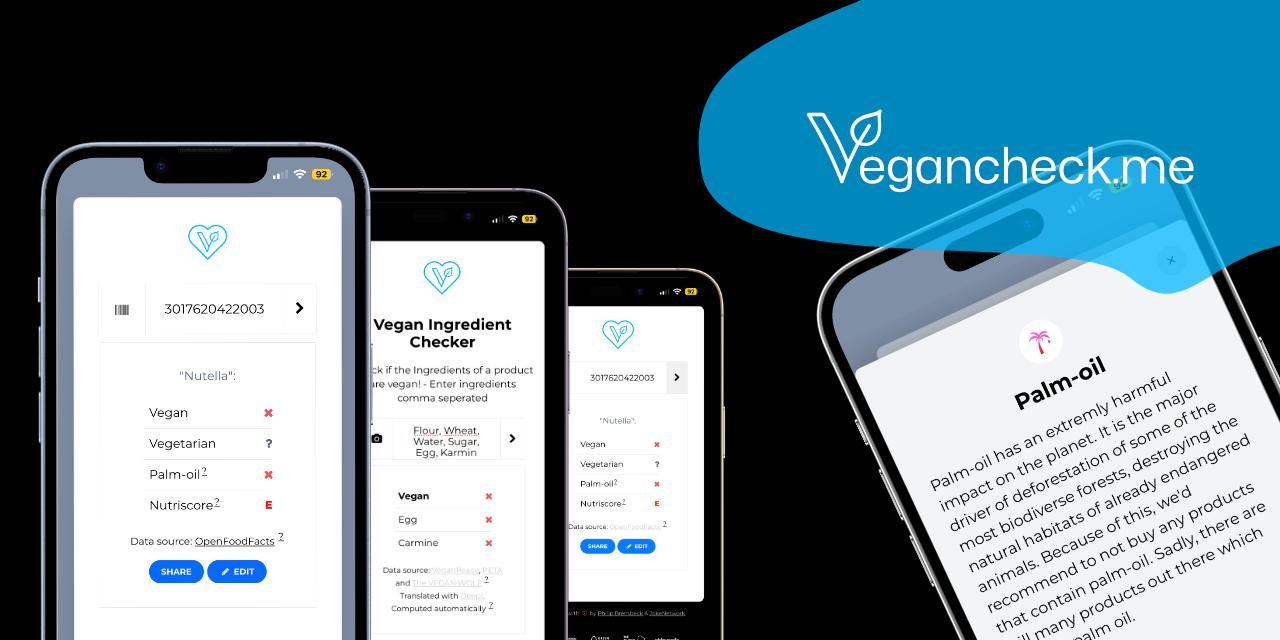
FreeCheck if a food product is vegan by scanning its barcode or searching by ingredient. Open-source, offline-capable. Built for people who want to verify product contents quickly.
How to install Veganify as a PWA
Frequently asked questions about Veganify
What makes Veganify different from Yuka or HappyCow?
Yuka is the dominant food-scanning app (40M+ users) but rates products on overall health, not specifically on vegan-friendliness — vegan status is a tag, not the primary axis. HappyCow is a restaurant locator, not a product scanner. Veganify is single-purpose: scan a barcode, get a vegan / vegetarian / non-vegan verdict with the specific non-vegan ingredients highlighted. The MIT-licensed open-source codebase, no-ads stance and no-account model make it the privacy-conscious choice. Yuka has broader product coverage; Veganify has clearer vegan-specific judgments.
Is Veganify free?
Yes — completely free, MIT-licensed open-source on GitHub, no ads, no in-app purchases, no account required. The project is community-maintained and integrates with OpenFoodFacts (also free / open data). There is no premium tier and no plans to introduce one. Donations to the maintainer and to OpenFoodFacts are voluntary. This is unusual in the food-scanning category, where Yuka monetizes a freemium tier with deeper recommendations.
How does Veganify compare to manually checking labels?
Reading labels manually catches obvious animal ingredients (milk, eggs, gelatin) but misses the trickier ones — E120 cochineal is an insect-derived red dye, E322 lecithin is usually plant-sourced but sometimes egg-derived, sugar in the US is sometimes processed with bone char, casein and whey are dairy derivatives that appear in unexpected places. Veganify's curated ingredient list catches these. For new vegans still learning the ingredient landscape it is essentially a teaching tool; experienced vegans use it as a fast double-check.
Can Veganify work offline?
Yes — Veganify is offline-first. The ingredient classification list (which ingredients are vegan, vegetarian or animal-derived) is cached locally. Barcode lookups against OpenFoodFacts require a network connection (the OFF API), but ingredient-list scanning can run fully offline using the cached classifier. The app is designed for grocery-store use where Wi-Fi is unreliable and cellular coverage is often poor inside large stores.
Who uses Veganify in production?
Veganify is recommended in r/vegan and r/PWA threads as the privacy-conscious vegan-scanner alternative to Yuka. The user base skews toward technical vegans (people who care about open-source and data ownership) and Europeans (where OpenFoodFacts coverage is strongest). New vegans use it as a learning tool; experienced vegans use it sporadically as a label-double-check. It is not the dominant tool in absolute numbers — Yuka has the mainstream user base — but Veganify is the recommended option for users who want the open / no-tracking version.
Where Veganify is heading (12-24 months)
- →Cosmetics and household product scanning (cruelty-free + vegan) would extend the use case beyond food.
- →OCR-based ingredient-photo input (snap a photo of an ingredients list, get the verdict) would unlock products not in OpenFoodFacts.
- →Tighter community feedback loop (users flagging missing or incorrect ingredient classifications) would speed database refinement.
Related questions
ChatGPT, Perplexity and Gemini usually suggest these next.
- Is E120 cochineal really not vegan?
- Does Veganify cover non-food products like cosmetics?
- How does Veganify handle 'may contain traces of milk' labels?
- Can I contribute to Veganify's ingredient classification list?
- How accurate is OpenFoodFacts compared to Yuka's database?
More in Utilities
Share files up to 10GB with end-to-end encryption. Files are never stored permanently — they vanish after download or 24 hours. No account, no tracking. Faster than WeTransfer.
Open-source password manager — the best LastPass alternative. End-to-end encrypted vault, browser extension, cross-device sync. Free for personal use, self-hostable.
Convert between 500+ file formats in your browser. Documents, images, audio, video, ebooks — fast client-side conversion that doesn't upload your files to a server.
Scan QR codes and barcodes using your device camera. Works offline, no app download needed. Faster than downloading a native app — just open in browser and scan.
Create QR codes for URLs, text, Wi-Fi, contacts, and more. Customize colors and download as SVG or PNG. No account, fully client-side, instant generation.
Bulk image editing in your browser — resize, crop, convert, compress hundreds of images at once. All processing is local, no server uploads. A massive time-saver for content creators.