Chrom8
In-depth reviewChrom8 provides instant cinematic photo grading, allowing users to adjust the vibe of their images. It functions as a tool for quick photo enhancement, focusing on visual style. The application helps users achieve desired aesthetic effects with a simple interface, as indicated by its description.
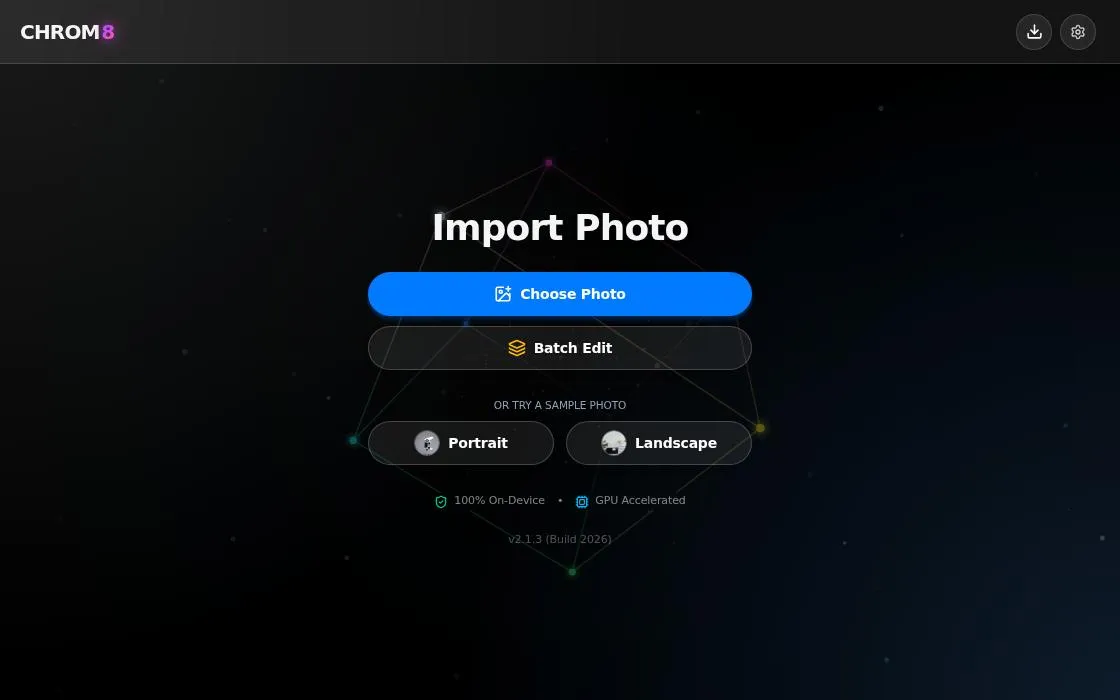
Chrom8, as it opens in a browser tab.
Not sure how to add Chrom8 to your home screen? Step-by-step for Chrome, Safari, Firefox and Edge — it takes about ten seconds, and there is no app store involved.
Own Chrom8? Have us re-run this measurement — we open it in a real browser, cut the network, and send you what survived.
How to install Chrom8 as a PWA
Why we recommend Chrom8
Chrom8 distinguishes itself by offering "instant cinematic photo grading." This suggests a focus on speed and a specific aesthetic style, allowing users to "glide left or right to set the vibe." The app's simplicity in adjusting photo aesthetics makes it appealing for users looking for quick, impactful visual changes without complex controls. Its PWA nature, indicated by the manifest, suggests a streamlined, app-like experience directly from the web, with a standalone display mode and custom theme/background colors for an immersive feel.
Best use cases
Best for: Users seeking to quickly apply a cinematic look to their photos. Ideal for enhancing social media images or personal photo collections with a distinct visual style. Useful for photographers or hobbyists who want to experiment with different photo moods without extensive manual adjustments, focusing on immediate visual feedback.
Honest limitations
Chrom8 appears to focus specifically on 'cinematic photo grading,' suggesting it may not offer a wide array of general photo editing features like cropping, exposure adjustments, or retouching tools. It is not designed for comprehensive image manipulation or professional-grade detailed edits beyond stylistic grading. There is no evidence of offline support, limiting its usability in environments without an internet connection.
Are you the maker of Chrom8? Claim this listing →
Similar to Chrom8
Art Filters is a Progressive Web App that provides a GPU image lab with artist-inspired effects. It allows users to apply tactile filters to images directly within their browser. The app is designed for playful experimentation with visual styles, offering a range of effects for creative image manipulation.
MINILAB is a digital tool designed for photographers interested in replicating the analog photo process. It offers features such as grain, film look, halation, paper, and scanner effects. The app aims to bring the entire analog workflow into a digital environment, allowing users to process their images with a classic aesthetic.
Color Pal helps users find color palettes and schemes for design projects. It provides a straightforward tool to explore and select color combinations. The app focuses on accessibility through its web-based interface, making it suitable for designers and creatives seeking visual inspiration and practical color solutions.

AI-powered background removal in seconds. Upload a photo and get a clean cut-out instantly. The fastest way to isolate subjects for product photos and profile pictures. Hair and semi-transparent edges are handled rather than clipped, which is where a manual selection usually fails.
GreetingCardGo is a PWA for creating personalized digital greeting cards. Users can choose from templates like birthday, thank-you, and business appreciation cards. It offers AI-powered customization, allowing users to replace photos and messages, then download or share their creations without needing to sign in initially.
PhotoStack is a browser-based image tool that converts, resizes, watermarks, and crops pictures in a few clicks. It suits bloggers, sellers, and anyone preparing photos for the web who wants quick edits without installing desktop software like Photoshop.
Own a PWA? See the listing options — standard submission is free.