Inka
In-depth reviewInka is a customizable writing room designed to adapt to your creative environment. Users can personalize their writing experience by adjusting rooms, sounds, page settings, and lighting. It is built to provide a focused and tailored space for writing, ensuring a smooth and responsive interface for composing text.
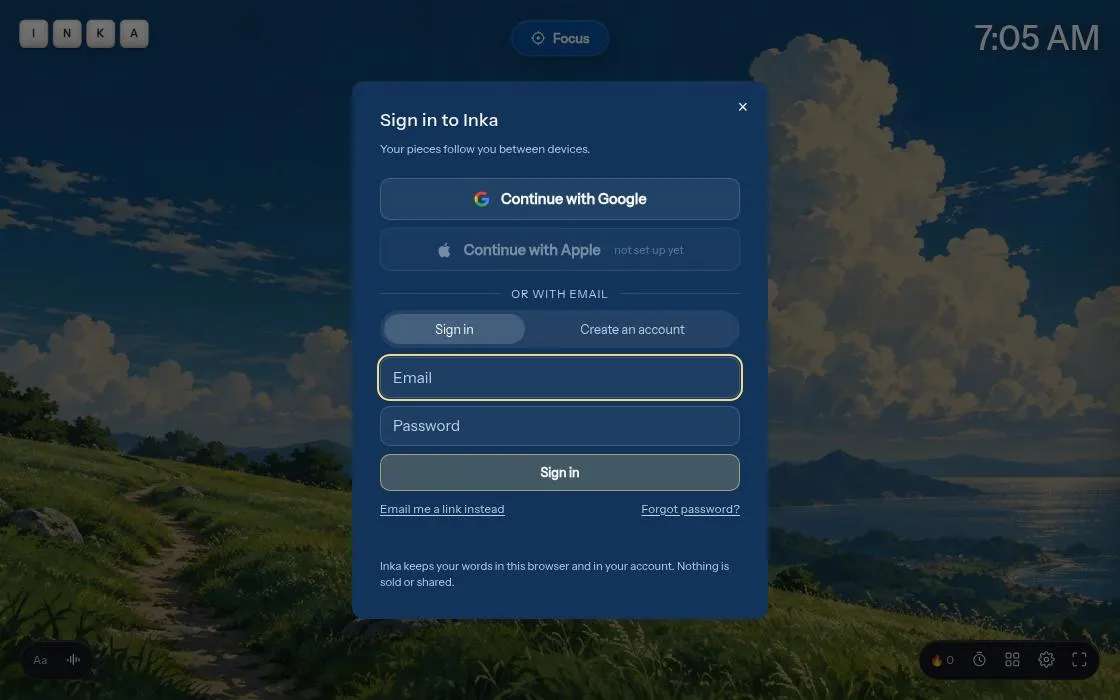
Inka, as it opens in a browser tab.
Not sure how to add Inka to your home screen? Step-by-step for Chrome, Safari, Firefox and Edge — it takes about ten seconds, and there is no app store involved.
Own Inka? Have us re-run this measurement — we open it in a real browser, cut the network, and send you what survived.
How to install Inka as a PWA
Why we recommend Inka
Inka distinguishes itself through its deep customization options, allowing writers to craft an environment that perfectly matches their 'vibe' with adjustable rooms, sounds, page configurations, and lighting. A notable technical detail is its self-hosted fonts (Fraunces, Newsreader, Instrument Sans, Inter, JetBrains Mono, Atkinson Hyperlegible), served directly from the app's domain. This design choice prevents reliance on third-party font providers, aiming for a faster initial load and a more consistent typing experience, particularly when network conditions are poor. The application appears to prioritize a smooth, uninterrupted writing flow through its architectural choices.
Best use cases
Best for: Writers seeking a highly personalized and distraction-free environment for their creative work. Ideal for authors, journalists, students, or anyone who values customizing their digital workspace to enhance focus and productivity. Suitable for individuals who prefer a tailored writing experience over a generic text editor, with options to adjust aesthetic and auditory elements.
Honest limitations
Inka is specifically designed as a writing room and may not be suitable for general-purpose document creation or complex word processing tasks requiring advanced formatting, collaboration features, or integration with external services. Its primary focus is on the writing experience itself rather than comprehensive document management or publishing workflows. While it appears to offer a good writing environment, there is no evidence to support offline functionality beyond the self-hosted fonts.
Are you the maker of Inka? Claim this listing →
Similar to Inka

Boxbreathing is a free, distraction-free progressive web app designed for box breathing exercises. Users can set custom intervals and session lengths to practice this calming technique. It aims to reduce stress and improve focus without requiring an account or displaying ads.

A quick, distraction-free notepad that runs in the browser and keeps working offline, powered by a service worker. It aims to be a lightweight scratchpad for jotting down text without the weight of a full note-taking suite like Evernote or Notion.
An online word processor with real-time collaboration, letting multiple people edit the same document together in the browser, similar in concept to Google Docs. Built by developer Piyush Sati, it targets writers and small teams who need shared text editing without desktop software.

A Markdown editor that opens and saves files directly on your device, built as a demo of the browser's File System Access API. Useful for writers who want to edit local Markdown documents in a browser, and for developers studying how the API handles local file workflows.
The open-source web editor for slide decks — create, present, and share presentations from the browser, with live audience interaction. The project is now archived: the hosted editor is offline, but the code remains open source and self-hostable.

Collaborative virtual whiteboard with a hand-drawn feel. Open-source Miro/Figma FigJam alternative — real-time collaboration, offline support, and end-to-end encrypted rooms.
Own a PWA? See the listing options — standard submission is free.