PassportPhoto.app
In-depth reviewCreate official passport and visa photos for various countries, including US 2x2in and UK 35x45mm. This free, privacy-first tool runs in your browser, ensuring photos remain on your device. Generate print layouts or digital JPEGs quickly.
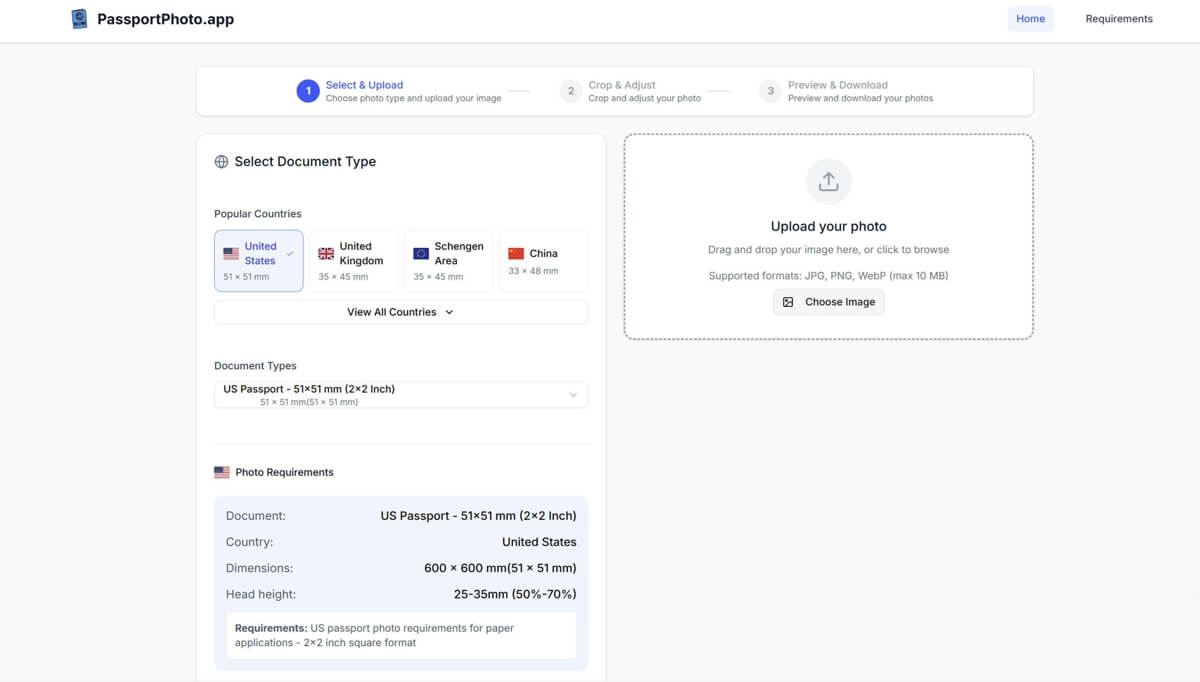
PassportPhoto.app, as it opens in a browser tab.
Not sure how to add PassportPhoto.app to your home screen? Step-by-step for Chrome, Safari, Firefox and Edge — it takes about ten seconds, and there is no app store involved.
Own PassportPhoto.app? Have us re-run this measurement — we open it in a real browser, wait for the service worker, and send you what it cached.
How to install PassportPhoto.app as a PWA
Screenshots
Why we recommend PassportPhoto.app
PassportPhoto.app stands out for its commitment to privacy and official compliance. It processes all images directly in your browser, meaning no uploads to external servers and photos stay on your device. The app provides country-specific templates, like US 2x2in or UK 35x45mm, with head guides to help users meet strict official requirements, reducing the chance of rejection. It offers free downloads without watermarks, available as JPEGs for online forms or print layouts for physical applications. Its comprehensive guides cover everything from taking photos at home to understanding country-specific rules, making it a reliable choice for anyone needing compliant passport or visa photos.
Best use cases
Best for: individuals needing to generate compliant passport or visa photos for various countries, directly from their browser. Ideal for those preparing online visa applications or passport renewals that accept digital JPEGs. Also suitable for users who prefer to print their own photos at home to save on costs, utilizing the provided print layouts. It's a great tool for anyone prioritizing privacy, as images are processed locally without server uploads.
Honest limitations
PassportPhoto.app is not a general-purpose beauty editor or photo filter app; its sole focus is on generating compliant passport photos. While it provides guides and helps with sizing, final approval depends on the photo's quality, background, expression, and the authority's standards. There is no explicit offline support mentioned, meaning an active internet connection is likely required for functionality. It is completely free, so there are no advanced paid features or subscription options.
Are you the maker of PassportPhoto.app? Claim this listing →
Is PassportPhoto.app yours? Add the “Listed on” badge
Optional, and it changes nothing about the listing. Paste it in your README or your site’s footer.

[](https://pwa.directory/directory/passportphoto-app)
<a href="https://pwa.directory/directory/passportphoto-app"><img src="https://pwa.directory/badge.svg" alt="Listed on pwa.directory" width="167" height="20"></a>
Similar to PassportPhoto.app

Blur faces, hide private details, and remove photo metadata directly in your browser. This free tool processes images locally, offering AI face detection without uploads, making it suitable for privacy-focused photo editing.

AllSubConverter is a privacy-first subtitle processing workspace. It offers 117+ tools to convert, edit, sync, translate, clean, and export subtitles across 11 core formats. Standard tools process files directly in your browser, catering to subtitle creators, translators, and developers.

ToolVero offers a collection of free, privacy-first browser-based tools for PDF, image, and text tasks. It provides utilities like PDF merging, image compression, text manipulation, and basic calculators, with a focus on client-side processing where practical. No account is required for core tools.
ImgMin is a free, privacy-focused online tool for compressing JPG, PNG, and WebP images. It performs all processing directly in your browser, ensuring no uploads and enhanced security. Reduce file sizes by up to 80% with adjustable quality settings and batch processing.
PureHub offers a collection of 25 free, ad-free, and privacy-first mini apps. These apps are designed for various daily utilities and productivity tasks, accessible directly from your browser. It provides tools such as QR code management, a focus timer, and a breathing guide.
PhotoCraft is a free, open-source online photo editor for editing images and layered PSD files directly in your browser. It leverages a Rust engine compiled to WebAssembly for native-speed performance, offering features like layers, masks, and adjustments without requiring an account for local use.
You built it. Let’s get it found.
Submit it to the directory and reach developers and users looking for exactly this.
Standard submission is free →