CMDragon Tools
In-depth reviewCMDragon Tools offers a comprehensive collection of free online utilities for various tasks. It provides tools for file conversion, image editing, and text processing, designed to help users boost their productivity with a wide range of functions available directly through their web browser.
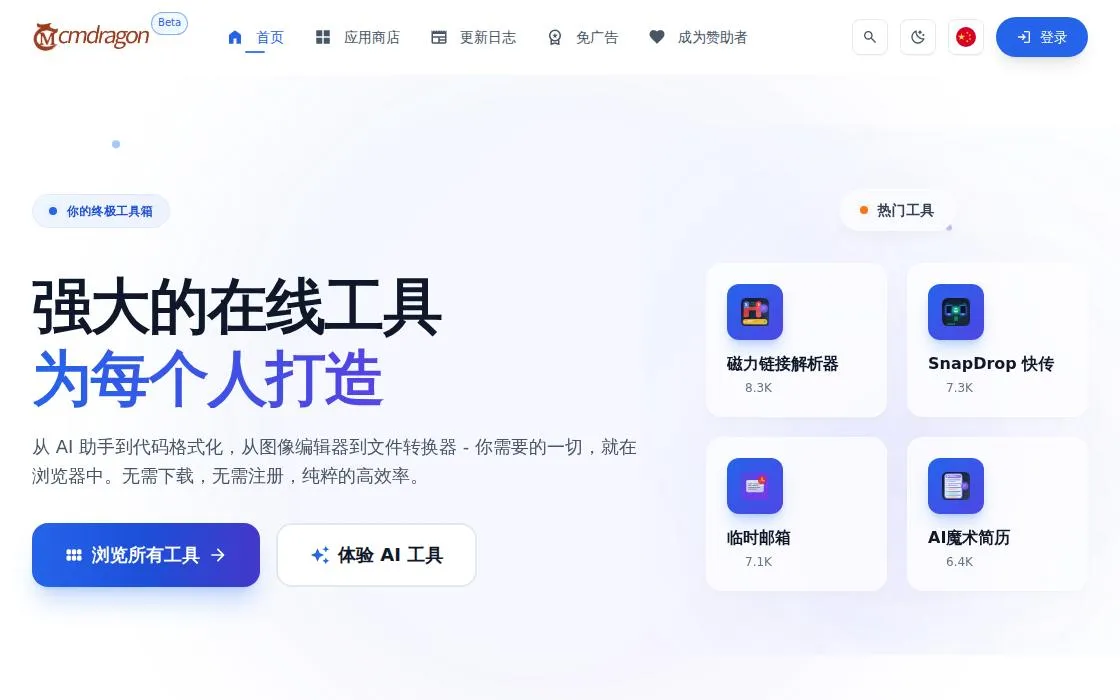
CMDragon Tools, as it opens in a browser tab.
Not sure how to add CMDragon Tools to your home screen? Step-by-step for Chrome, Safari, Firefox and Edge — it takes about ten seconds, and there is no app store involved.
Own CMDragon Tools? Have us re-run this measurement — we open it in a real browser, wait for the service worker, and send you what it cached.
How to install CMDragon Tools as a PWA
Why we recommend CMDragon Tools
CMDragon Tools stands out as a versatile online toolbox, as indicated by its manifest description focusing on 'file conversion, image editing, text processing, and more.' The landing page reinforces this by declaring '强大在线工具,人人可用' (Powerful online tools, available to everyone). This positions it as a practical resource for individuals seeking quick, accessible solutions for common digital tasks without the need for software installations. Its 'standalone' display mode suggests an app-like experience, offering a focused environment for utilizing its diverse utilities. The availability of both desktop and mobile homepage screenshots highlights a consistent user experience across different form factors.
Best use cases
Best for: Users needing quick, free access to tools for converting files, performing basic image manipulations, or processing text without downloading software. It's ideal for students, casual users, or professionals requiring on-the-fly utility for everyday digital tasks directly from a web browser. Useful for one-off conversions or edits where a full software suite is unnecessary.
Honest limitations
CMDragon Tools is not for users requiring advanced or professional-grade features in areas like image editing or complex file conversions. Its focus on 'free online tools' implies a utility-oriented approach rather than deep functionality. The lack of service worker evidence indicates it doesn't offer offline access, so a continuous internet connection is necessary for use.
Are you the maker of CMDragon Tools? Claim this listing →
Is CMDragon Tools yours? Add the “Listed on” badge
Optional, and it changes nothing about the listing. Paste it in your README or your site’s footer.

[](https://pwa.directory/directory/cmdragon-tools)
<a href="https://pwa.directory/directory/cmdragon-tools"><img src="https://pwa.directory/badge.svg" alt="Listed on pwa.directory" width="167" height="20"></a>
Similar to CMDragon Tools

pdftomd.tools is a free, in-browser tool for converting text-based PDFs to Markdown and vice-versa. It processes files locally, ensuring privacy, and extracts headings, lists, and tables. No account is required for basic conversions.

BasePic offers free hosting for images, videos, and various files up to 2 GB. Users can upload content to get a short link instantly, without requiring an account or watermarks. It also provides tools for editing photos and videos.
Practical Web Tools offers a collection of browser-based utilities including file converters, calculators, and PDF editors. It provides tools for various categories such as video, audio, image, and document conversion, along with finance and math calculators. File conversions are processed locally in your browser using WebAssembly, ensuring no uploads for many tools. It aims to be a comprehensive resource for everyday web-based tasks.
ToolVero offers a collection of free, privacy-first browser-based tools for PDF, image, and text tasks. It provides utilities like PDF merging, image compression, text manipulation, and basic calculators, with a focus on client-side processing where practical. No account is required for core tools.
Convert between 500+ file formats in your browser. Documents, images, audio, video, ebooks — fast client-side conversion that doesn't upload your files to a server. Conversion runs client-side, so a confidential document is never uploaded anywhere to change format.
DocuCraft offers a suite of private, browser-based tools for managing PDF documents. It provides various utilities and conversion functionalities directly within your web browser, designed for users needing straightforward document handling without server-side processing.
You built it. Let’s get it found.
Submit it to the directory and reach developers and users looking for exactly this.
Standard submission is free →