Driftya
In-depth reviewDriftya provides a platform for shared notes. It allows users to create and manage collaborative text content, serving as a central hub for shared information. The application integrates various tools, including a text editor, to support diverse content creation and management needs for shared documents.
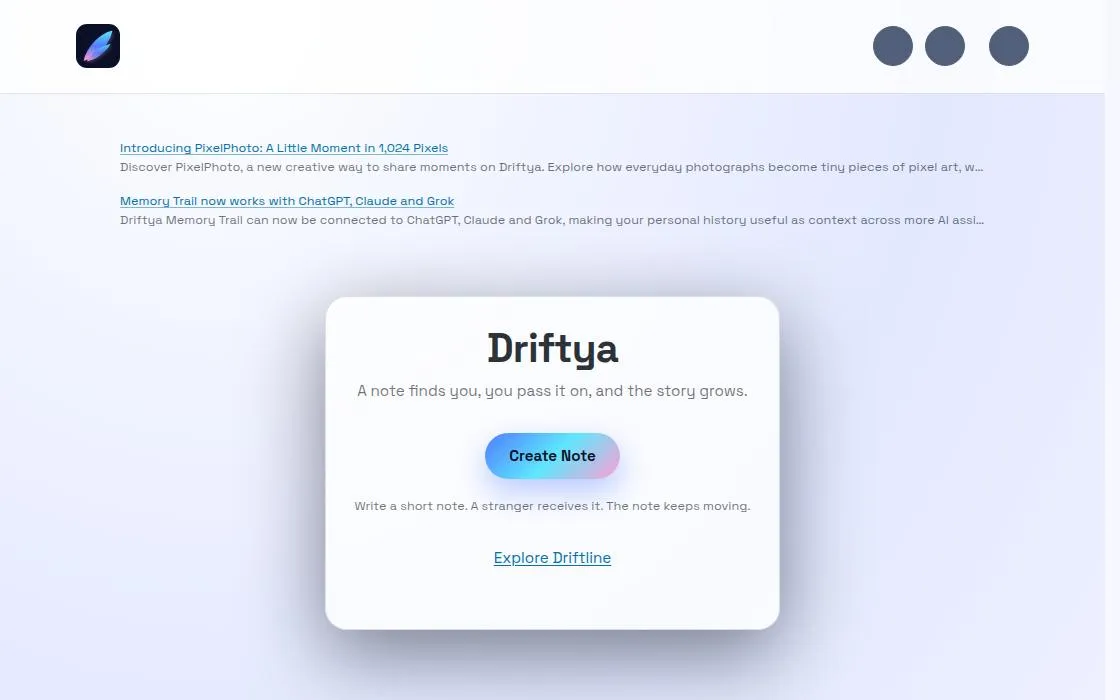
Driftya, as it opens in a browser tab.
Not sure how to add Driftya to your home screen? Step-by-step for Chrome, Safari, Firefox and Edge — it takes about ten seconds, and there is no app store involved.
Own Driftya? Have us re-run this measurement — we open it in a real browser, wait for the service worker, and send you what it cached.
How to install Driftya as a PWA
Why we recommend Driftya
Driftya stands out for its straightforward approach to shared note-taking. Its core functionality as 'A shared note' simplifies collaboration, making it easy for users to create and manage content together. The manifest indicates a dedicated 'Text Editor' shortcut, suggesting robust tools for content creation within the app. Furthermore, the presence of a service worker enhances its web app capabilities, providing a reliable and installable experience. The design seems focused on utility and direct access to key features like 'Today' and the 'Text Editor', ensuring an efficient user workflow for collaborative content.
Best use cases
Best for: Teams and individuals needing a central repository for collaborative notes and documents. Ideal for project groups sharing meeting minutes or ongoing tasks, or for students collaborating on research papers. It's also suitable for personal use to organize thoughts and share them easily with others, leveraging its text editing capabilities.
Honest limitations
While Driftya excels at shared notes and text editing, its current description does not indicate advanced features like real-time co-editing beyond shared notes, or extensive rich media support. It's not designed for complex project management or as a full-fledged office suite. Information regarding pricing models or offline functionality beyond basic service worker registration is not available from the provided content.
Are you the maker of Driftya? Claim this listing →
Is Driftya yours? Add the “Listed on” badge
Optional, and it changes nothing about the listing. Paste it in your README or your site’s footer.

[](https://pwa.directory/directory/driftya)
<a href="https://pwa.directory/directory/driftya"><img src="https://pwa.directory/badge.svg" alt="Listed on pwa.directory" width="167" height="20"></a>
Similar to Driftya

A quick, distraction-free notepad that runs in the browser and keeps working offline, powered by a service worker. It aims to be a lightweight scratchpad for jotting down text without the weight of a full note-taking suite like Evernote or Notion.

List 55 is a web app for fast voice transcription, converting spoken words into clean, copyable lists. It's designed for users who need to quickly capture audio notes and transform them into structured text for other applications, streamlining productivity and information organization.
An online word processor with real-time collaboration, letting multiple people edit the same document together in the browser, similar in concept to Google Docs. Built by developer Piyush Sati, it targets writers and small teams who need shared text editing without desktop software.

ReWords AI allows users to edit and replace text directly within images online. It aims to match the original font, style, and background of the text being replaced. This tool is designed for updating text in flat image files like screenshots, posters, or packaging without needing original project files.
AllSubConverter is a privacy-first subtitle processing workspace. It offers 117+ tools to convert, edit, sync, translate, clean, and export subtitles across 11 core formats. Standard tools process files directly in your browser, catering to subtitle creators, translators, and developers.

Inka is a customizable writing room designed to adapt to your creative environment. Users can personalize their writing experience by adjusting rooms, sounds, page settings, and lighting. It is built to provide a focused and tailored space for writing, ensuring a smooth and responsive interface for composing text.
You built it. Let’s get it found.
Submit it to the directory and reach developers and users looking for exactly this.
Standard submission is free →